In today’s fast-paced digital environment, businesses and individuals are constantly looking for ways to save time, reduce repetitive work, and improve productivity. Automation software makes this possible by connecting applications, managing routine processes, and allowing teams to focus on more valuable tasks.
From marketing and sales to customer support and IT operations, automation can transform the way work gets done. Modern platforms increasingly combine workflow automation with artificial intelligence, making it possible to build smarter processes with less manual effort.
Here are five of the top automation software tools worth considering in 2026.
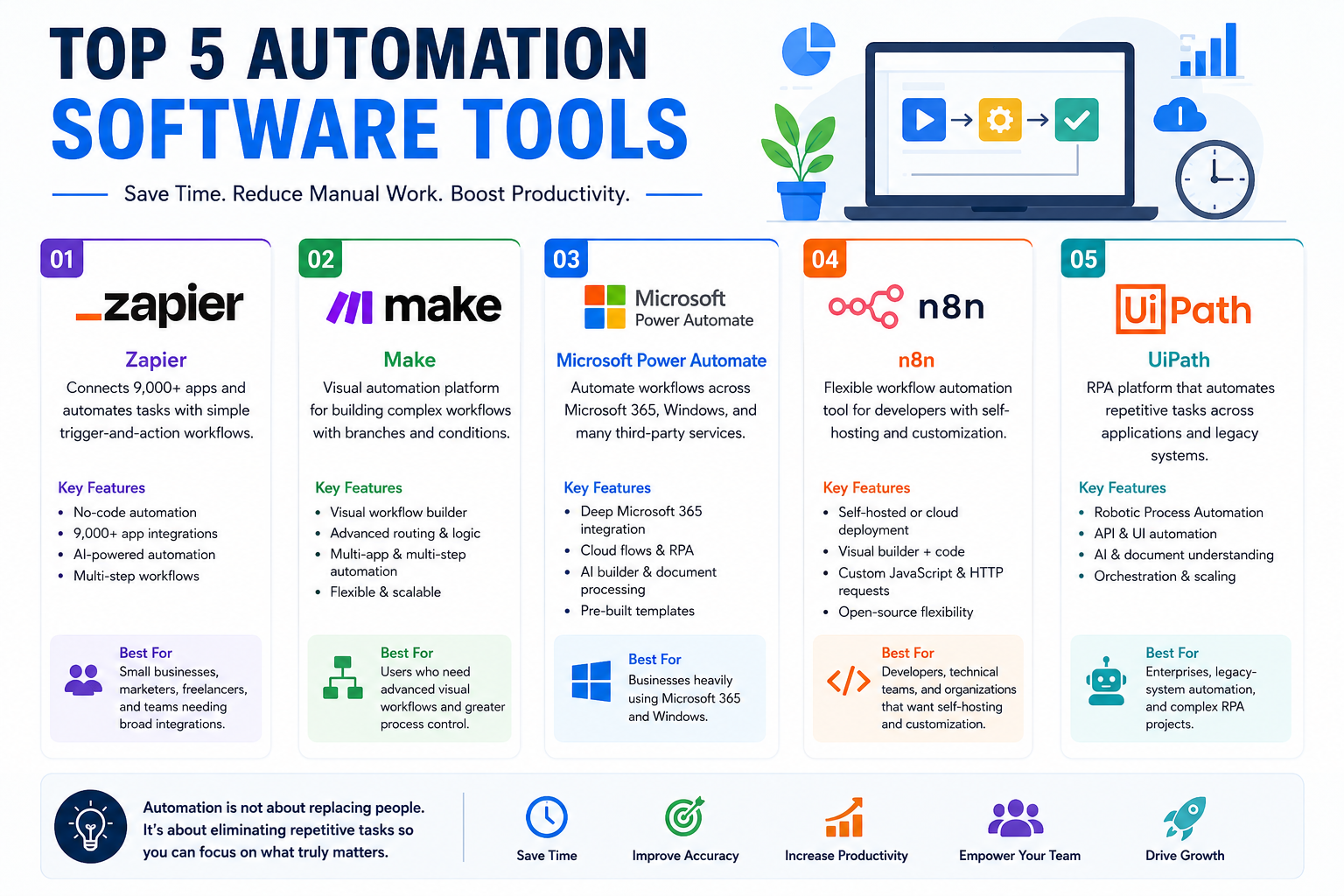
1. Zapier
Zapier is one of the most popular automation platforms for connecting different applications and creating automated workflows. Its trigger-and-action approach allows users to automate tasks without needing extensive programming knowledge. Zapier currently supports more than 9,000 apps, making it useful for businesses with a wide variety of software tools. (Zapier Help)
For example, a business can create a workflow that automatically adds a new website lead to a CRM, sends a notification to a sales team, and creates a follow-up task. Zapier also offers AI-powered automation features that can help summarize information, classify data, draft content, and make workflow decisions.
Best for: Small businesses, marketers, freelancers, and teams that need broad app integrations.
2. Make
Make is a powerful visual automation platform designed for users who want more control over complex workflows. Its visual canvas allows users to create multi-step processes, branches, and different paths based on conditions.
One of Make’s major strengths is its flexibility. Instead of simply connecting one trigger to one action, users can design sophisticated workflows involving multiple applications and decision points. Current comparisons highlight Make as a strong choice for visual workflow building, with a free plan and paid plans starting around $12 per month. (Zapier)
For example, an e-commerce company could use Make to receive an order, check inventory, update a database, notify the warehouse, and send a customized email to the customer.
Best for: Users who need advanced visual workflows and greater process control.
3. Microsoft Power Automate
Microsoft Power Automate is an excellent option for organizations already using Microsoft products such as Microsoft 365, Outlook, Excel, Teams, SharePoint, and OneDrive. The platform allows users to automate workflows across Microsoft applications as well as numerous third-party services.
Power Automate supports both cloud-based workflows and robotic process automation (RPA). It can also use AI capabilities to help create workflows and process documents. Microsoft-heavy organizations can particularly benefit from its deep integration with the company’s ecosystem. (Zapier)
A common example would be automatically saving email attachments to SharePoint, extracting information from documents, and notifying a team member through Microsoft Teams.
Best for: Businesses that rely heavily on Microsoft 365 and Windows.
4. n8n
n8n is a flexible workflow automation platform that appeals particularly to developers and technically experienced users. One of its biggest advantages is the ability to self-host the platform, giving organizations greater control over their infrastructure and data.
Users can build workflows visually while also adding custom JavaScript and HTTP requests when more advanced functionality is required. n8n provides a free self-hosted Community Edition, while hosted plans are available for organizations that prefer not to manage their own infrastructure. (Zapier)
For businesses with specific data-residency requirements or developers who want deep customization, n8n can be an attractive alternative to purely cloud-based automation platforms.
Best for: Developers, technical teams, and organizations that want self-hosting and customization.
5. UiPath
UiPath focuses on robotic process automation (RPA), making it particularly useful for automating tasks performed through software interfaces. Unlike traditional workflow tools that primarily connect applications through APIs, RPA can interact with applications much like a human user—clicking buttons, entering information, and moving data between systems.
This makes UiPath especially valuable for organizations that depend on older software or systems without modern APIs. UiPath also combines RPA with API-based automation, orchestration, and AI capabilities. (Zapier)
For example, a company could use a UiPath bot to extract information from invoices, enter the data into an older accounting system, and route exceptions to a human employee.
Best for: Enterprises, legacy-system automation, and complex RPA projects.
How to Choose the Right Automation Tool
The best automation software depends on your specific requirements. If you want an easy-to-use platform with a huge range of integrations, Zapier is a strong starting point. If you need sophisticated visual workflows, Make may be more suitable.
For Microsoft-focused organizations, Power Automate offers particularly strong integration. Developers who prioritize customization and infrastructure control should consider n8n, while businesses dealing with legacy applications and large-scale RPA requirements may find UiPath the better choice.
Automation should not simply be about replacing human work. The real goal is to eliminate repetitive tasks, reduce errors, improve consistency, and give employees more time to focus on strategic and creative work.
Conclusions
Automation software has become an important part of modern business operations. Tools such as Zapier, Make, Microsoft Power Automate, n8n, and UiPath offer different approaches to automating everyday processes.
There is no single tool that is perfect for every organization. The right choice depends on your applications, technical expertise, budget, security requirements, and the complexity of your workflows. Start by identifying repetitive tasks in your organization, then choose a platform that can automate those processes reliably and scale with your needs.
With the right automation strategy, businesses can spend less time on repetitive work and more time on growth, innovation, and serving their customers.