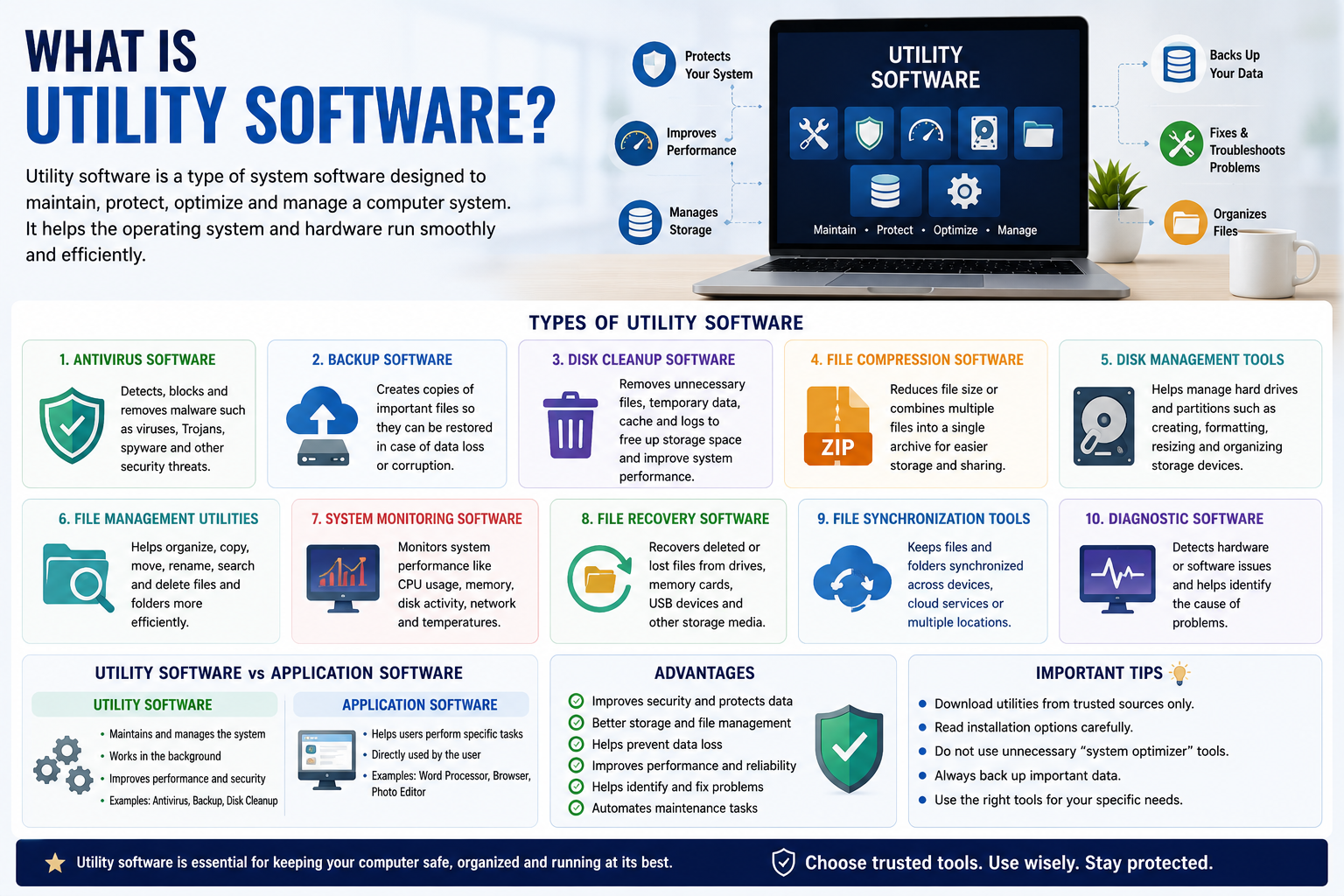
Utility software is an important category of computer software designed to help users manage, maintain, protect, optimize, and troubleshoot a computer system. Unlike application software, which is usually created to help users perform specific tasks such as writing documents, editing photos, or browsing the internet, utility software works mainly behind the scenes to keep a computer running efficiently.
From antivirus programs and file-compression tools to disk-cleanup applications and backup software, utility programs are found on almost every modern computer. They can improve system performance, protect important information, manage files, and solve common technical problems.
What Is Utility Software?
Utility software is a type of system software that performs maintenance and management tasks on a computer or other digital device. It helps the operating system and hardware function more efficiently.
Some utility programs are included with an operating system, while others can be downloaded and installed separately. For example, Windows includes tools for disk management, storage optimization, system recovery, and security. Third-party developers also offer specialized utilities with additional features.
The main purpose of utility software is to make computer systems more reliable, secure, and efficient.
Why Is Utility Software Important?
Computers constantly create and store files, temporary data, logs, cached information, and other digital resources. Over time, unnecessary data can consume storage space and affect system organization.
Utility software helps users manage these issues. A disk-cleanup tool, for example, can identify unnecessary files and help free storage space. Backup software can create copies of important documents, while antivirus software can detect potentially harmful programs.
Without proper maintenance, computers can become harder to manage and may be more vulnerable to data loss or security threats. Utility software provides tools that make many maintenance tasks easier.
Types of Utility Software
There are many different types of utility software. Each category performs a specific function.
1. Antivirus Software
Antivirus software is one of the best-known types of utility software. It is designed to detect, block, and remove malicious software such as viruses, Trojans, spyware, and other malware.
Modern security tools can provide real-time monitoring and scan downloaded files, applications, websites, and storage devices for potential threats.
Keeping security software updated is important because new malware is continually being developed.
2. Backup Software
Backup utilities create copies of important files so they can be recovered if the original data is accidentally deleted, corrupted, or lost.
Backup software may save information to an external hard drive, network storage, or cloud service. Some tools can perform automatic backups according to a schedule.
For businesses and individuals, regular backups are an important part of protecting valuable information.
3. Disk Cleanup Software
Computers often accumulate temporary files, cached data, old installation files, and other unnecessary information. Disk-cleanup utilities help identify this data and allow users to remove it.
Freeing unnecessary files can provide additional storage space and make file management easier. However, users should be careful when deleting system files and should only remove data they understand.
4. File Compression Software
File-compression utilities reduce the size of files or combine multiple files into a single archive.
Popular archive formats include ZIP and 7Z. Compression is useful when sending large groups of files through email, storing data, or transferring information between devices.
Programs such as 7-Zip and other archive managers can create and extract compressed files.
5. Disk Management Tools
Disk-management utilities help users manage storage drives and partitions. Depending on the operating system and software, these tools may allow users to create, format, resize, or organize partitions.
These utilities are particularly useful for advanced users and system administrators. However, incorrectly modifying partitions can result in data loss, so important information should be backed up first.
6. File Management Utilities
File-management tools help users organize, copy, move, rename, search, and delete files and folders.
Although operating systems already provide basic file-management capabilities, specialized utilities can offer additional features such as advanced search, duplicate-file detection, batch renaming, and synchronization.
7. System Monitoring Software
System-monitoring utilities provide information about how a computer is performing. They can display CPU usage, memory consumption, storage activity, network traffic, temperature readings, and other system information.
These tools are useful when diagnosing slow performance or identifying applications that consume excessive resources.
Utility Software vs Application Software
Utility software and application software have different primary purposes.
Application software is generally designed to help users accomplish tasks. Examples include word processors, web browsers, video editors, accounting applications, and graphic-design programs.
Utility software, on the other hand, focuses on maintaining, protecting, optimizing, or managing the computer system.
For example, Microsoft Word helps a user create documents, while antivirus software helps protect the computer from malware. Both are useful, but their purposes are different.
Advantages of Utility Software
Utility software provides several important benefits.
Improved security: Security utilities can help detect and block malware.
Better storage management: Cleanup and file-management tools help users control storage space.
Data protection: Backup utilities provide additional protection against data loss.
Improved troubleshooting: Diagnostic tools can help identify hardware and software problems.
Better performance monitoring: System utilities provide information about resource usage.
Greater convenience: Automation features can perform maintenance tasks without requiring constant manual intervention.
Are Utility Programs Always Safe?
Not every utility program available online should be trusted. Some websites distribute fake optimization tools, unwanted applications, or potentially malicious software under the name of system utilities.
Users should download utility software from reputable developers and official websites whenever possible. It is also important to read installation options carefully because some free utilities may offer additional software or change browser settings.
Before using disk-management, registry-cleaning, or system-repair tools, users should also create a backup of important information.
Examples of Utility Software
Common examples of utility software include:
- Antivirus and security tools
- Backup applications
- Disk-cleanup utilities
- File-compression programs
- Disk-management tools
- File-recovery software
- System-monitoring utilities
- Storage-analysis applications
- File-synchronization tools
- Diagnostic software
Many operating systems already include basic utilities, meaning users may not need to install third-party software for every maintenance task.
Final Thoughts
Utility software plays a vital role in modern computing. It helps users protect data, manage files, maintain storage, monitor performance, troubleshoot problems, and keep computers running efficiently.
Whether you are using an antivirus program, creating a backup, compressing files, or checking system performance, you are likely benefiting from utility software.
The best approach is to use trusted utilities that match your specific needs. Avoid unnecessary system-optimization tools, keep important data backed up, and download software from reliable sources. With the right utility programs, users can maintain a safer, more organized, and more dependable computer system.